
Most analysis tools share the same limitation:
they only help you when you remember to open them.
You visit the site, check a few numbers, maybe inspect your build, and then close the tab.
But the important moments do not happen on schedule.
A resistance can become uncapped after an item swap. Your Oracle insight can change after a passive respec. A new build milestone can be reached while you are not looking.
By the time you return, the moment may already be gone.
That is why we built the Path of Codex Notification Center — a core part of the Season 0.5 update.
It was not created to generate more alerts.
It was created to build a persistent inbox for signals that actually matter.
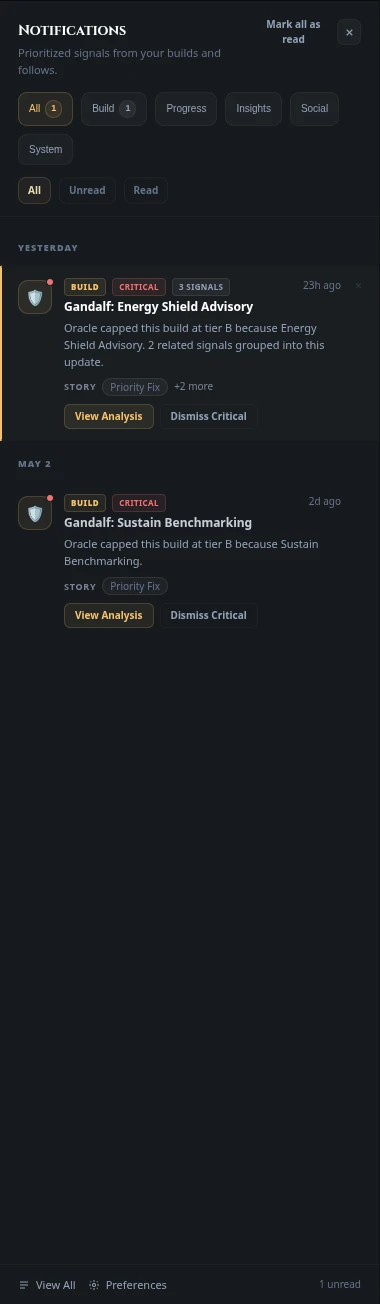
The core idea
Most build analysis systems are passive.
You open the tool.
You inspect the data.
You leave.
But meaningful build moments do not wait for manual checks.
The Notification Center changes that dynamic by bringing the analysis directly to you.
When something relevant changes in your build, progression, or platform activity, it appears inside a structured inbox with context, categorization, and severity.
This is not a noisy stream of alerts.
It is a decision layer built around your character's evolution.
And those signals are not random. They are generated by the same systems that already understand your build:
- Oracle Journal & Verdict
- Oracle Score
- Timeline
- Build synchronization events
- Progression analysis systems
What gets surfaced
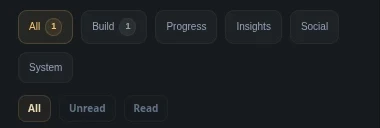
The Notification Center organizes information into four major categories.
Build
This is where structural problems appear first.
If your defenses weaken, a resistance becomes uncapped, or an important layer disappears after a gear change, the system surfaces it immediately.
These signals come directly from the same contextual analysis used by the Oracle Verdict — but instead of waiting for you to manually inspect the build, the analysis actively reaches you.
Progress
Progress captures movement.
Milestones, meaningful improvements, level progression, and structural upgrades appear here in real time.
Many of these moments are also recorded historically inside your Timeline, but the Notification Center ensures you do not miss the moment your build actually evolves.
Insights
This is where analysis becomes actionable.
When your Oracle Score changes, when a pillar weakens, or when the system detects a new contextual conclusion about your build, it appears here.
A score alone is static.
An insight delivered at the right moment becomes useful.
System
System notifications reflect activity happening across the platform itself.
Build sync completions, snapshot creation, feature availability, and account-related events appear here so you always know when your data is updated and your tools are ready.
More than a feed: a real inbox
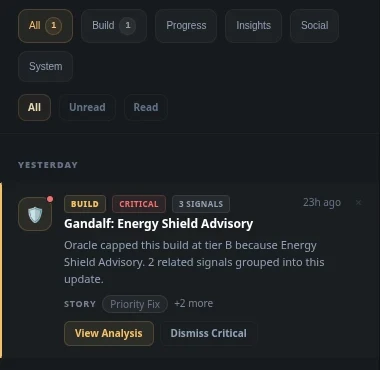
This is not a temporary stream of alerts.
It is a true Notification Center.
Signals can be filtered, archived, grouped, and organized based on relevance.
Some notifications require immediate attention.
Some are useful as long-term context.
Some have already been resolved.
The system reflects those differences.
Related events can also be grouped into connected sequences.
A single notification tells you that something changed.
A grouped sequence tells you your build is moving in a direction.
And later, those same moments can be revisited historically through your Timeline.
Each notification can also receive feedback:
- Useful
- Already handled
- Not relevant
This allows the system to improve signal quality over time and adapt to what actually matters for your progression.
Severity still matters
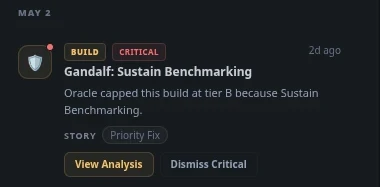
Not every signal carries the same weight.
Instead of using a simple table, the Notification Center treats severity as part of the build context itself.
Critical
Immediate issues affecting build stability.
Examples include:
- Uncapped resistances
- Missing defensive layers
- Sudden Oracle degradation
- Structural survivability problems
These notifications are designed to surface problems before they become expensive mistakes.
Warning
Important changes worth attention.
These signals may not break your build immediately, but they indicate that something important is shifting.
Examples include:
- Defensive trends weakening over time
- Significant Oracle Score drops
- Important stat regressions
- Potential efficiency losses
Info
General updates and contextual system activity.
Examples include:
- Build sync completion
- Snapshot generation
- Timeline events
- Feature availability
These notifications keep your analysis ecosystem connected and current.
Success
Positive confirmations and progression milestones.
Examples include:
- Successful build improvements
- Milestone completions
- Defensive stabilization
- Meaningful Oracle Score growth
Because understanding progress is just as important as identifying problems.
Connected to the entire platform
The Notification Center is not an isolated feature.
It exists as a connective layer between every major Path of Codex system.
- Oracle Verdict generates structural analysis
- Oracle Score tracks build quality
- Timeline records long-term evolution
- Build Compare helps evaluate decisions
- Notifications surface the important moments between them
Together, these systems transform build analysis from static inspection into continuous progression intelligence.
Why this matters
A build is rarely defined by one item.
Or one score.
Or one moment.
What matters is understanding:
- when something changed,
- why it changed,
- and whether that direction is actually helping your progression.
The Notification Center exists to make those moments visible while they are still actionable.
Because analysis becomes far more useful when it arrives at the right time.
This article is part of the Path of Codex Season 0.5 update.